// W WHIPLASH
UE 5.6 // C++ // Gameplay Systems

WHIPLASH(WIP)

Third person character system developed in C++ using UE5 - Custom Ability System, Weapons System inspired by Lyra, Motion Matching-based Locomotion Stack controlling around 3,000 animations. Traversal System has been replicated from Game Animation Sample Blueprint provided by Epic to C++.

Custom lightweight GAS-style character framework.

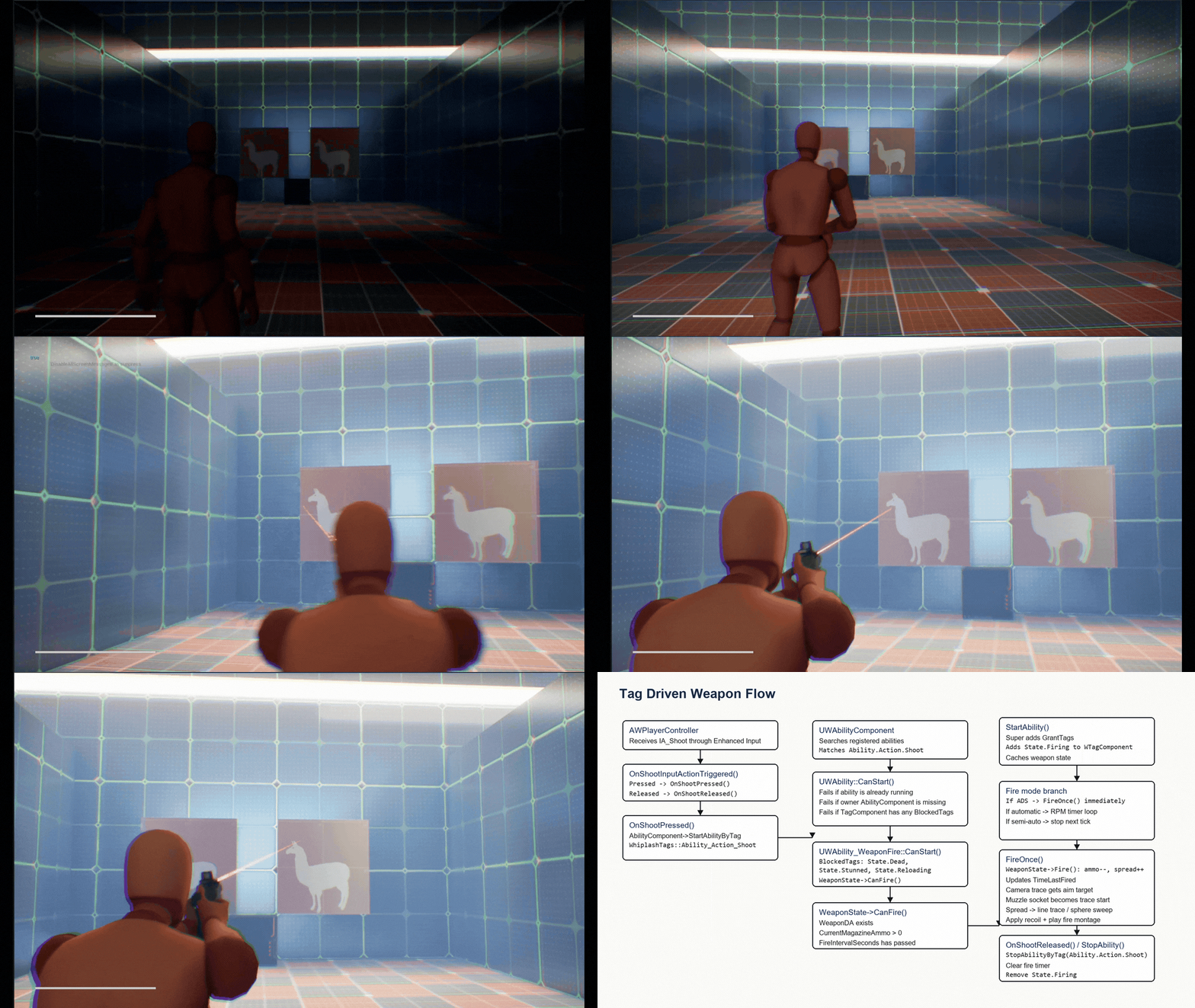
Whiplash is built around a modular C++ character framework where input requests abilities by gameplay tag, abilities grant or block state tags, and gameplay systems react through shared components instead of one-off input scripts.

Enhanced Input Ability Tag Ability Lifecycle Gameplay Tags Animation / Weapon / Stamina Response

Ability + Tag Layer

WAbilityComponent manages ability objects and enables or disables actions through tags. TMap<FGameplayTag, int32> allows multiple systems to assign the same state. OnTagChanged sends signals for changes in states, allowing characters to respond to such things as crouching, ADS'ing, and shooting.
Custom Attribute Modifiers

Attribute modifiers support Add, Multiply, and Override with durations and tick intervals. Timer callbacks use BindWeakLambda, removed modifiers rebuild the stack to avoid drift, stamina regen stops at max, and depletion delegates fire once.

Interface-Based Access

Gameplay systems query shared components through IWComponentInterface instead of hard actor casts, keeping weapons, animation, stamina, and UI less tightly coupled.

Lightweight Ability Objects

Abilities are UObject-based with BlueprintNativeEvent lifecycle hooks, preserving tag-gated activation and designer override points without taking on full GAS cost.

Tag-driven activation flow preview
Ability Framework

Tag-driven activation

Show input requesting an ability tag, with granted and blocked states updating.

Modifier stack response preview
Attributes

Modifier stack response

Show stamina drain, regen delay, and modifier recalculation in motion.

Tag reaction flow preview
State Events

Tag reaction flow

Show crouch, ADS, or firing tags triggering character and UI responses.

Data-driven weapon state with simulated spread.

UWWeaponStateComponent separates weapon tuning from runtime behavior: weapon data stays designer-editable, while the component handles fire timing, ammo, recoil, spread recovery, first-shot accuracy, and damage attenuation hooks.

Spread Simulation First-Shot Accuracy Recoil Runtime State Component Weapon Data Asset Hitscan Pipeline Physical Material Zones Ability-Based Firing Auto / Semi Fire Modes

Ticked Spread Simulation

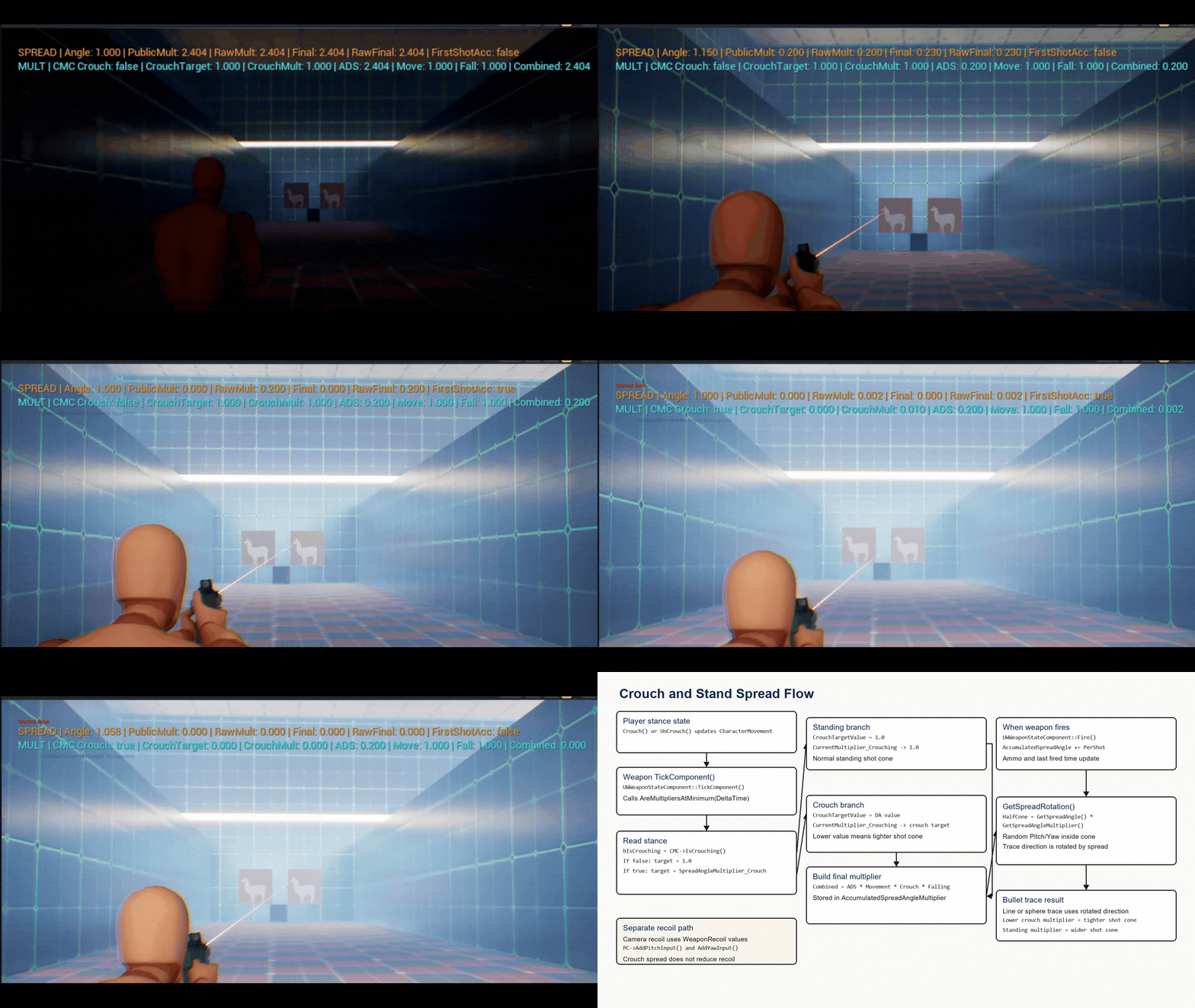
Spread is not a fixed random cone. ADS, movement, crouch, and falling multipliers interpolate every tick, then multiply into the final shot spread.

First-Shot Accuracy

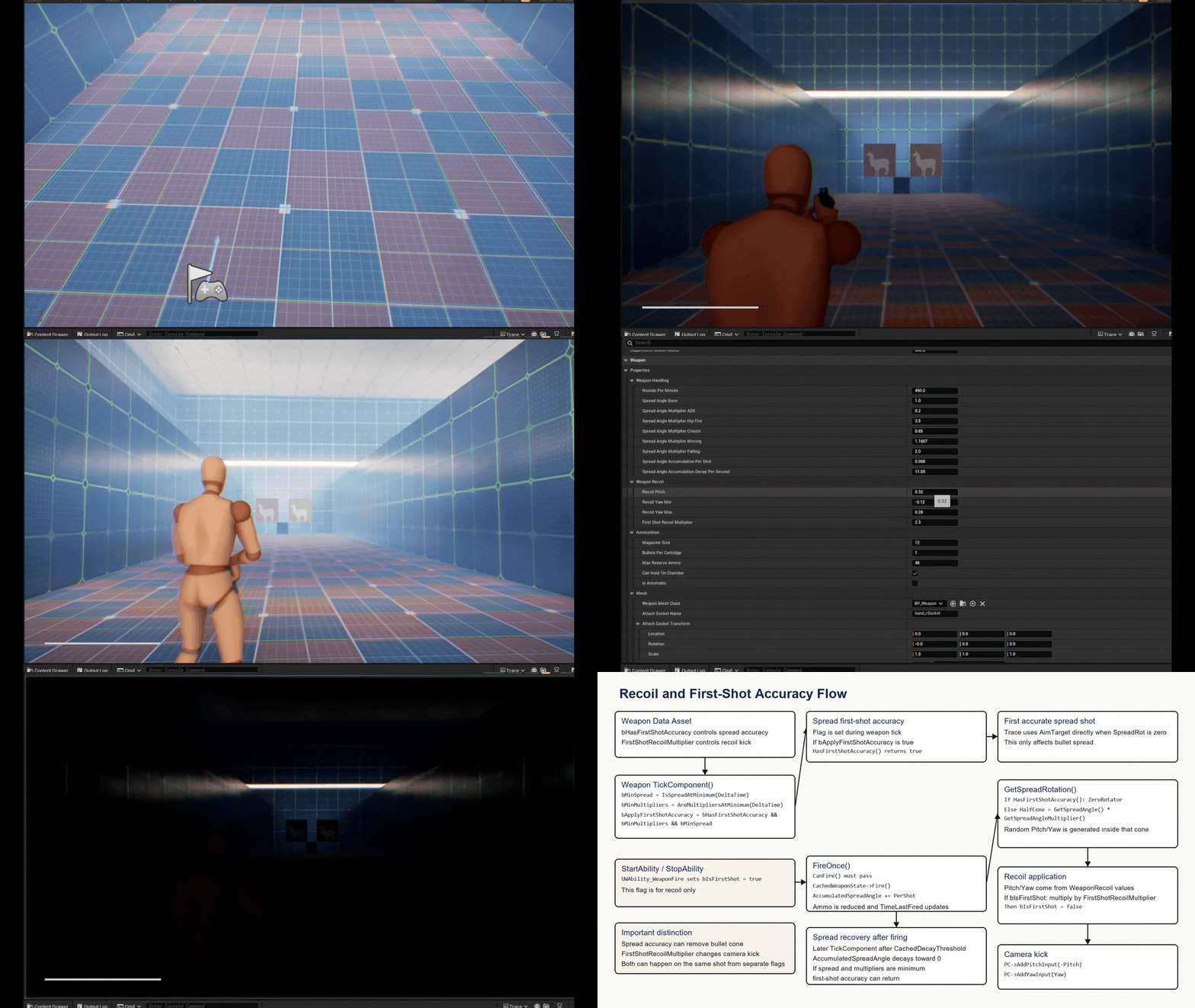
First-shot accuracy returns only after spread decay and contextual multipliers converge, with a cached decay threshold derived from weapon fire rate.

Data-Driven Damage

Distance falloff uses a designer-editable FRuntimeFloatCurve. Hit surface and damage-zone multipliers use TMap<FGameplayTag, float>, so headshots, limb shots, and surface types can be configured per weapon data asset.

Ability Fire Pipeline

The fire ability validates the weapon interface, checks CanFire, traces from camera to target and muzzle to hit, applies spread/recoil, and plays fire montage data.

Contextual spread changes gameplay GIF
Spread

Contextual spread changes

Show ADS, movement, crouch, and falling multipliers affecting shot spread.

Recoil and first-shot accuracy gameplay GIF
Fire Pipeline

Recoil and first-shot accuracy

Show weapon firing, recoil feedback, and spread recovering back to accuracy.

Game Animation Sample-Style Motion Matching, Extended in C++.

The base Animation Blueprint is based on Epic's Game Animation Sample Motion Matching setup. My implementation work focuses on moving the gameplay-side character, movement, camera, and traversal decision logic into C++, then layering weapon-ready poses on top with linked animation layers and Blueprint Thread Safe helpers where appropriate.

Game Animation Sample Base C++ Character Port Motion Matching Pose Search Thread Safe AnimBP Helpers Linked Animation Layers Pistol Overlay Poses Traversal Montage Bridge

C++ Character Port

AWCharacter owns camera updates, gait selection, rotation mode, directional max speed, landing state, and traversal requests that were Blueprint-side in the sample-style setup.

Motion Matching Bridge

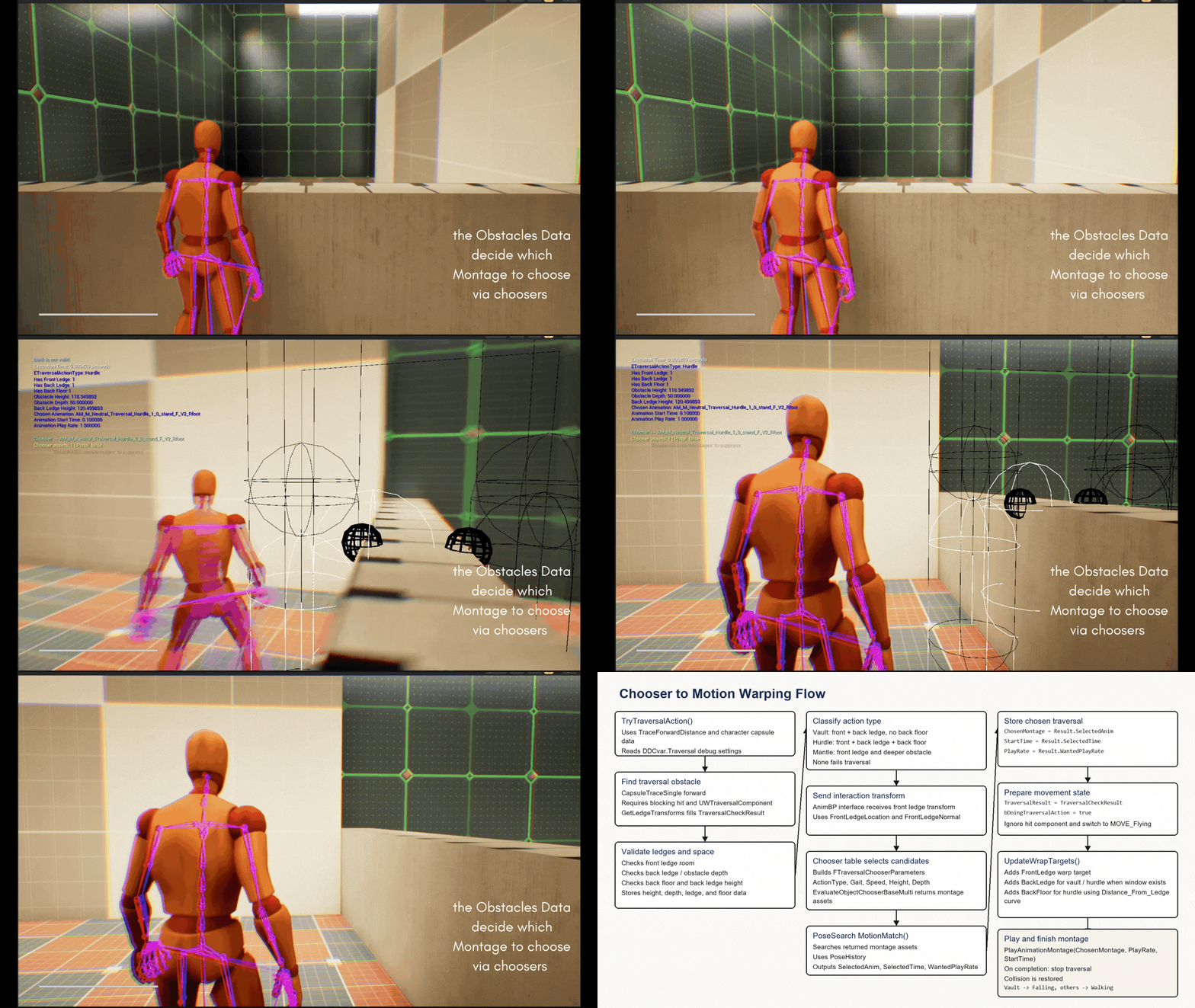
Traversal builds Chooser parameters, evaluates candidate montages, then calls UPoseSearchLibrary::MotionMatch to select montage, start time, and play rate.

Linked Weapon Overlays

The Motion Matching locomotion pose stays as the base layer, while linked overlay layers add pistol-ready, aim, firing, two-handed, and crouched weapon poses.

Thread-Safe AnimBP Helpers

Animation helper logic is organized with Blueprint Thread Safe functions where appropriate, while C++ exposes gameplay state such as equipped weapon, aiming, and traversal.

Motion matching base pose gameplay GIF
Locomotion

Motion Matching base pose

Show starts, stops, pivots, sprinting, and crouched locomotion selection.

Weapon-ready animation overlay gameplay GIF
Overlay Layers

Weapon-ready poses

Show pistol-ready, aim, firing, and crouched overlays layered above locomotion.

Chooser to Motion Warping traversal GIF
Traversal

Chooser to Motion Warping

Show obstacle classification, montage selection, and aligned traversal playback.

Extra systems working under the hood!!

Input, camera, stamina, traversal data, flashlight behavior, and debug tools built around the main character framework.

01

Enhanced Input Routing

  • AWPlayerController binds movement, world-space movement, look, walk, sprint, jump, crouch, strafe, perspective, aim, shoot, and flashlight actions.
  • Controller input stays focused on player intent, while character/components own the gameplay response.
02

Camera Mode Parameters

  • FCameraParameters drives first-person, third-person far, third-person close, and third-person aim camera styles.
  • Spring arm length, socket offset, FOV, camera lag, and transition speed interpolate per camera mode.
03

Movement + Gait Rules

  • Walk, run, sprint, and crouch speeds use forward/strafe/backward speed vectors instead of one flat max speed.
  • A strafe speed curve maps movement direction into the character movement component's max speed.
04

Stamina + HUD Hooks

  • Health and stamina changes broadcast through attribute delegates rather than being polled by UI.
  • The main HUD updates the stamina widget when stamina changes; out-of-stamina stops sprint drain behavior.
05

Flashlight Interface

  • Flashlight input calls an interface on the currently equipped weapon actor instead of hard-coding a pistol class.
  • The weapon mesh actor owns the spotlight toggle and uses an IES light profile from the Fab asset IES Light Profile Pack for the flashlight beam.
  • A custom time-driven flashlight material creates the blinking effect independently of input and weapon logic.
06

Traversal Obstacle + Interaction Data

  • UWTraversalComponent stores spline ledges, opposite ledge pairs, and minimum ledge width for traversal-ready obstacles.
  • It resolves front and back ledge locations/normals into FTraversalCheckResult, giving the character clean obstacle data before montage selection.
  • IWInteractionTInterface passes the front-ledge interaction transform into the AnimBP without hard-coding the animation Blueprint class.
07

Debug + Test Utilities

  • UWGameInstanceSubsystem listens to Motion Matching and traversal console variables, then rebroadcasts changes through Blueprint-assignable events.
  • AWAttributeSetTester exposes Call In Editor actions for damage, healing, stamina drain, regen, and modifier validation.

UE Systems Used.

Unreal Engine 5.6 C++ Blueprints Enhanced Input Gameplay Tags Custom GAS-style abilities Pose Search Motion Matching Chooser Motion Warping Animation Warping UMG Data Assets Line / sweep traces Timers and delegates

AI Enemy + Rifle

Researching neural-network assisted enemy behavior layered with State Tree and Behavior Tree logic.

Game Design Document

A full GDD for Whiplash will be uploaded soon.

Save / Load System

Planned persistence for player progress, weapon state, and project-specific gameplay data.

AI State Debug Display

In-game debug UI for reading enemy awareness, current state, and behavior decisions while testing.

Shadow Dash Ability

A player dash that relocates the character to a corner or shadow point outside enemy sightlines.

More Systems

Cover system support plus additional stealth, combat (Katana Ability), traversal (more traversal animations to add), and AI debug tools will be added as the project grows.